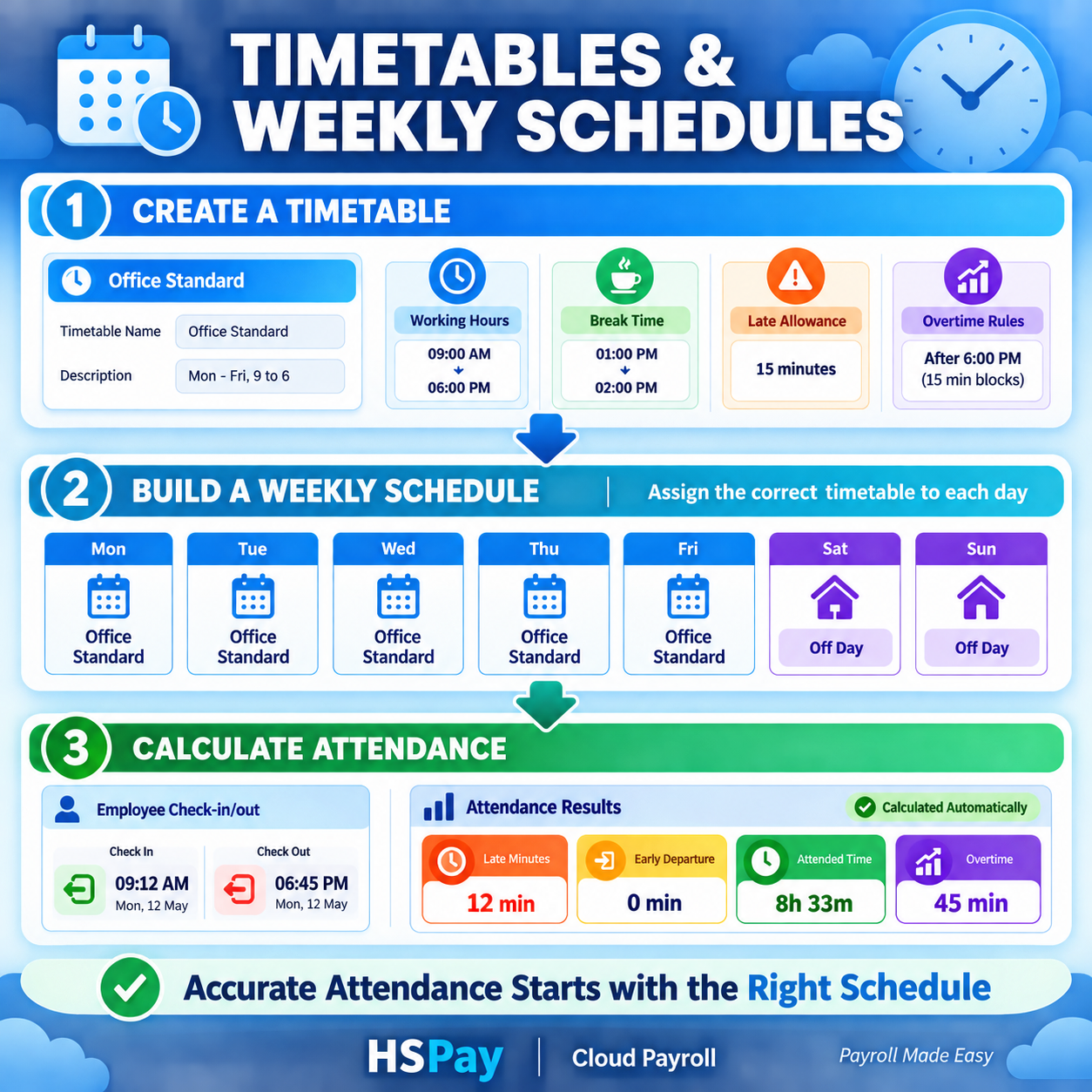
Accurate attendance calculation begins with a clearly defined working schedule. If a payroll system does not know when an employee is expected to start work, finish work or take a break, it cannot accurately identify late arrivals, early departures, attended time or overtime.
HSPay Cloud Payroll solves this by separating the setup into two connected components: timetables and weekly schedules. A timetable defines the rules for one working day, while a weekly schedule assigns the appropriate timetable—or an off day—to every day of the week.
Once the correct weekly schedule is assigned to an employee, HSPay can compare the employee’s actual check-in and check-out records with the expected working pattern and calculate attendance results according to the company’s configured rules.
What Is a Timetable in HSPay?
A timetable is a collection of working-time rules for a particular type of workday. It tells HSPay when employees are expected to begin and finish work and how attendance should be evaluated.
For example, an Office Standard timetable might contain:
- Working hours from 9:00 AM to 6:00 PM
- A lunch break from 1:00 PM to 2:00 PM
- A 15-minute late allowance
- Overtime eligibility after the scheduled finishing time
Companies can create different timetables for different employee groups, departments, shifts or operational requirements.
Information Included in a Timetable
Depending on the company’s attendance policies and HSPay configuration, a timetable may include the following information.
Scheduled check-in time
This is the time at which the employee is expected to start work. HSPay uses it when evaluating whether the employee arrived on time or late.
Scheduled check-out time
This is the employee’s expected finishing time. It helps the system identify early departures and attendance beyond the scheduled work period.
Break duration
The configured break time can be considered when calculating attended or working time. The treatment of breaks should match the company’s official attendance policy.
Late allowable minutes
A company may allow employees to arrive a limited number of minutes after the scheduled starting time without recording a late deduction. The late allowance must be configured according to the organization’s policy.
Early-leave allowance
If the company permits a small early-departure tolerance, it can be considered when evaluating the employee’s checkout time.
Overtime rules
The timetable can help determine when attendance falls outside scheduled working hours. However, overtime payment should follow the company’s configured OT rules and approval process.
Holiday and off-day behaviour
Separate timetable or schedule settings may be required for normal working days, weekly off days and holidays. These rules should be verified before payroll processing.
What Is a Weekly Schedule?
A weekly schedule is a seven-day work pattern created by assigning a timetable or an off day to each day from Monday to Sunday.
For example:
| DayAssigned timetable | |
| Monday | Office Standard |
| Tuesday | Office Standard |
| Wednesday | Office Standard |
| Thursday | Office Standard |
| Friday | Office Standard |
| Saturday | Off Day |
| Sunday | Off Day |
This weekly schedule tells HSPay that the employee is expected to work according to the Office Standard timetable from Monday to Friday, while Saturday and Sunday are regular off days.
Another employee group could use a different weekly schedule with Saturday as a working day, rotating off days or a different timetable for selected weekdays.
Difference Between a Timetable and a Weekly Schedule
Although the two features work together, they have different purposes.
| Feature | Purpose |
| Timetable | Defines working hours, breaks, allowances and time-related rules for one type of day |
| Weekly schedule | Assigns a timetable or off day to each day of the week |
A timetable answers the question, “What are the rules for this working day?”
A weekly schedule answers the question, “Which timetable applies on each day of the week?”
How HSPay Uses the Schedule to Calculate Attendance
After an employee’s schedule has been assigned, HSPay can compare the expected timetable with actual attendance records received or entered into the system.
The basic workflow is:
- Create the required timetable.
- Define working hours, breaks and allowable minutes.
- Build a weekly schedule.
- Assign a timetable or off day to each weekday.
- Assign the weekly schedule to the relevant employee.
- Receive or enter employee check-in and check-out records.
- Review the calculated attendance results.
- Submit attendance for supervisor approval.
- Use approved information during payroll processing.
Attendance Results Calculated from the Schedule
Late minutes
HSPay compares the actual check-in time with the scheduled starting time and applicable late allowance. If the employee arrives beyond the allowed period, the system can record the relevant late minutes according to its configured logic.
Early-departure minutes
The actual check-out time is compared with the scheduled finishing time and any early-leave allowance. This helps identify employees who leave before completing their scheduled work period.
Attended time
Attended time represents the attendance duration recognized by the system after applying the relevant schedule and break rules.
Overtime
Attendance recorded outside scheduled working hours may be considered when calculating overtime. Final overtime should remain subject to the company’s rounding rules, eligibility settings and supervisor approval workflow.
Off-day attendance
When attendance is recorded on a scheduled off day, the record should be handled according to the company’s selected attendance status and approval policy. In HSPay, off-day work does not need to be treated automatically as approved overtime; a supervisor can review and approve the appropriate value based on company policy.
Why Accurate Schedule Assignment Is Important
Even a correctly configured timetable cannot produce accurate results if the wrong schedule is assigned to an employee.
Incorrect schedule assignments can cause:
- Normal arrivals to appear late
- Correct departures to appear early
- Incorrect attended-minute calculations
- Unnecessary absence records
- Incorrect off-day identification
- Misleading overtime values
- Payroll errors requiring manual correction
Organizations should therefore review employee schedule assignments whenever an employee joins, transfers to another department, changes shifts or receives a new working pattern.
Benefits for Sri Lankan Businesses
Using structured timetables and weekly schedules can help businesses:
- Apply attendance policies consistently
- Reduce repeated manual attendance calculations
- Identify late arrivals and early departures more accurately
- Support different employee groups and shifts
- Improve supervisor attendance review
- Maintain clearer attendance records for payroll preparation
- Reduce preventable payroll corrections
- Connect fingerprint attendance information with payroll processing
HSPay provides these features as part of a connected cloud attendance and payroll workflow for Sri Lankan organizations.
Best Practices When Creating Timetables
Use clear timetable names
Choose names that are easy for HR and payroll users to understand, such as Office Standard, Factory Morning Shift, Night Shift or Saturday Half Day.
Confirm working hours with management
Do not create schedules based only on informal working habits. Confirm official working hours, breaks and allowable minutes with authorized management.
Create separate timetables when rules differ
If two employee groups have different starting times, breaks or overtime conditions, create separate timetables rather than attempting to use one schedule for everyone.
Check overnight shifts carefully
Shifts that begin on one day and finish on the following day require careful configuration and testing.
Test before assigning to all employees
Assign the schedule to a small employee group first and verify late minutes, early departures, breaks, off days and overtime before wider deployment.
Review effective dates
When an employee changes shifts, ensure the new assignment becomes effective on the correct date without changing previously approved attendance unexpectedly.
Frequently Asked Questions
Can one timetable be used in several weekly schedules?
Yes. The same timetable can be assigned to different weekly schedules when the daily working rules are identical but the weekly work patterns differ.
Can different timetables be assigned within one week?
Yes. A weekly schedule may contain different timetables for different days, provided the company has created the required daily timetable definitions.
Can Saturday and Sunday be configured as off days?
Yes. Any applicable day can be assigned as an off day according to the organization’s weekly work pattern.
Can employees have different weekly schedules?
Yes. Different schedules can be assigned to employees or groups according to their roles, departments, branches or shifts.
Does the timetable automatically approve overtime?
No. The timetable helps the system identify attendance outside scheduled hours. Overtime should still follow the company’s configured rules and supervisor review process.
What should be done when an employee changes shifts?
Assign the appropriate new schedule using the correct effective date and verify that future attendance uses the new working pattern.
Accurate Attendance Starts with the Right Schedule
Timetables and weekly schedules form the foundation of automated attendance calculation. By defining clear daily working rules and assigning the correct pattern to each employee, organizations can improve the accuracy of late minutes, early departures, attended time and overtime information.
HSPay Cloud Payroll brings scheduling, attendance review and payroll processing into one connected system, helping Sri Lankan businesses reduce manual work and manage employee attendance with greater consistency.
HSPay Cloud Payroll — Payroll Made Easy.
Visit www.hspay.lk to learn more or request a demonstration.
Suggested internal links
- Create a timetable → Timetable setup guide
- Assign weekly schedules → Employee schedule assignment guide
- Attendance review → Attendance review and approval guide
- Overtime settings → Company OT settings guide
- Payroll processing → HSPay payroll process guide
Suggested social sharing description
Learn how HSPay timetables and weekly schedules help Sri Lankan businesses calculate late minutes, early departures, attended time and overtime accurately.
Screenshots
Follow the screenshots below together with the instructions in this article.